¶ Chat Message Modding
¶ Custom Commands
To create a custom command, we are going to be doing two things. First is create a mod component with a custom blueprint event. This will be the command we want to execute. Then in our ModRegistry, we are going to edit the On Chat Message function to call our command.
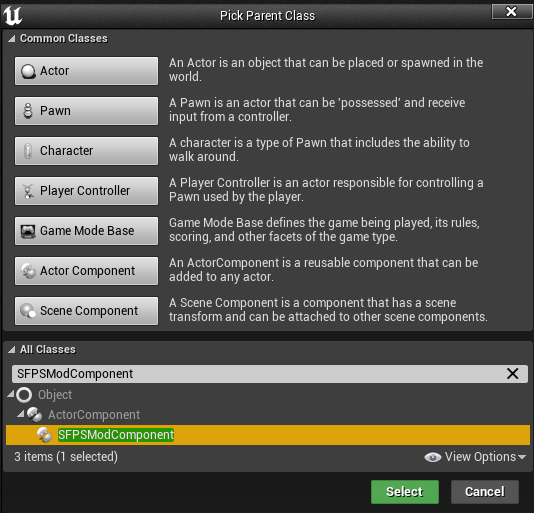
First create a mod component by right clicking inside your mod folder. Select create new blueprint, then search for SFPSModComponent. Select this class type, and click the green select button to create your new mod component.
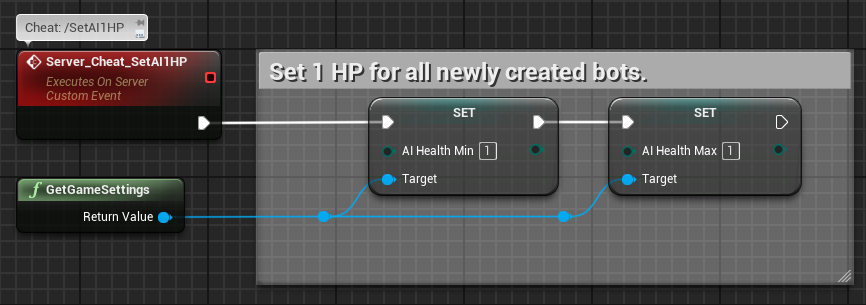
Open your new mod component, and create a custom event. Name the event what you like, this name will not be the name of the command you use in chat. Under the replicates section of details, make sure to select Runs on Server. From here, you connect the execution line to whatever logic you would like to execute. Here is an example provided from the example mod:
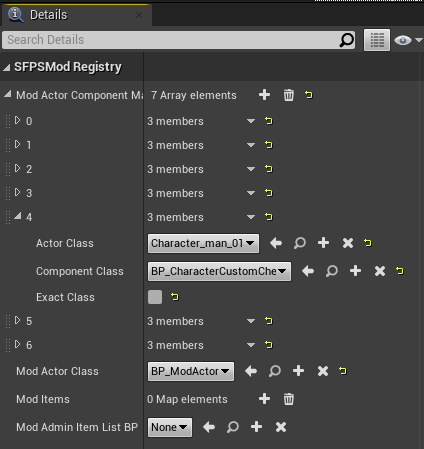
Next we need to put your modded component into your ModRegisty. Under the details tab, click the plus button to add another array element to Mod Actor Component Mappings. Expand your new array. For actor class, we select Character_Man_01 to assign the component to your player character. For component class, you select your mod component.
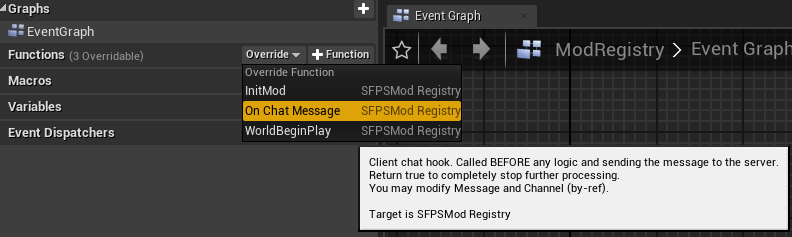
Once you have setup your component, we need to setup the chat command to execute your mod component. Go to your ModRegistry, under functions there is an override option. In that dropdown menu is On Chat Message, selecting that will open a new function graph. Here we create a functional command
The OnChatMessage function has a few options to customize your command, for example your command could be only used by specific Steam IDs, it could be only sent by admins, or only sent in specific channels.
To begin, we place the Get Component By Class function and connect the character reference from OnChatMessage to the target of Get Component By Class. For component class, select the mod component we just made. Next create an Is Valid function, found under Time Management. Connect the execution line to OnChatMessage, and connect the return value of Get Component By Class to the Input Object of Is Valid. On the execution line for Is Not Valid, connect it to an unchecked return node. This ensures only logic from your mod component is used.
For a basic command to function we need to define the command message itself. Place an (Equal) string function into your function graph, connecting one string to the message string on the OnChatMessage function. The other string is where you can write your command, for example write /dswiki. Create a branch function, and connect the execution line to the Is Valid output of the Is Valid function we created earlier. Connect the boolean return value of your (Equal) string function to the condition of the branch function. Create another return node, and connect the false execution line to it. This tells the function to only execute if the chat message matches the command we just defined.
From the true execution line, we connect that to the custom event we created earlier in your mod component. Just search for the name of the custom command, if you assigned your mod component to your ModRegistry, it should appear. Finally we place a return function at the end of the execution line, with a check on the return value. This tells the function that it executed successfully.
Here is an example of a setup OnChatMessage function from the example mod. It has an Is Any Admin function to limit the command to admins only
